Accurate, Portable Network Time Synchronization
Version 1.05 (March 5, 1998)
JSNTP is a Java standalone application (Java 1.1.6 or greater) that lets you synchronize your computer's clock with any one of the dozens of NTP servers operating on the Internet. JSNTP can be configured to request time from the server on demand, or to continuously request time at random intervals. This latter option lets JSNTP act as a stealthy "pinger" to keep a dial-up connection alive during periods of inactivity, in addition to keeping your computer's time very accurate.
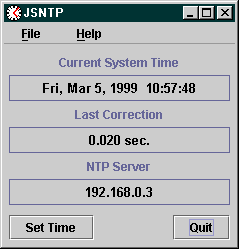
JSNTP Client - Screenshot (Windows 95)
JSNTP, unlike its predecessors TickTock I and TickTock II, uses Simple Network Time Protocol (SNTP) to acchieve accuracy that is typically around 50 milliseconds. In order to maintain this level of accuracy, JSNTP uses Java Native Interface (JNI) compliant native methods to set your system's clock. Native code libraries are provided for Windows 95/98/NT, Solaris (2.5.1 or greater, Intel or SPARC), MacOS and Linux (x86). JSNTP will detect your platform at runtime and will load the appropriate code. (Note: On the Mac, limitations prevent setting the system clock with millisecond accuracy, thus accuracy will be about a half second.)
If you are not running the platforms that support the provided native code, you may still use JSNTP. You can disable the native code feature in JSNTP's configuration, and specify command templates that the program will execute in a system shell. In most cases, use of command templates will result in reduced accuracy, about one second, due to the overhead of the system call. (Note that some UNIX platforms may be able to maintain millisecond accuracy if they support the Solaris-like ADJUST command.)
Using JSNTP requires an installed Java 1.1 runtime (Java 1.1.6 or greater or MRJ 2.1) Java runtimes for Windows and Solaris platforms are freely available from Sun Microsystems's JavaSoft Division. For Linux, go to www.blackdown.org. MRJ 2.1 for MacOS is available at www.apple.com/java.
For Windows users, a version of JSNTP is available that includes the necessary Java Runtime components.
JSNTP is available in a self-extracting Windows 95/NT installer, that includes the necesary Java Runtime Environment. This is a larger download, but very easy to install, especially for those unfamiliar with installing the Java Runtime. Simply download the distribution file, and double click on it to run the installer. You can uninstall JSNTP by going to the control panel, selecting add/remove programs, and then selecting JSNTP.
JSNTP for the Mac is provided in a bin file that will unpack itself if double-clicked or dropped into the Stuffit Expander. Run the extracted installer by double clicking on it, and follow the instructions that follow. (MRJ 2.1 is required to run the installer.) The installer will place a JSNTP icon on the Mac desktop, that can be run like any Mac program.
After installing JSNTP on the Mac, look in the installation folder. You will see a file named settime.sit.hqx. You must expand this file in order for JSNTP to use native methods on the Mac. Drop it into your StuffIt expander, and it will expand to a file named settime, which contains the native method used to set time on the Mac. The file settime should be in the same folder as the JSNTP application icon.
Change the permission of the downloaded bin file to executable
chmod +x jsntp105_unix.bin
and run the bin file in a console window on your graphical desktop. Follow the instructions to install JSNTP on your system.
If you are running JSNTP on a Solaris machine and plan on using the native code library that will be unpacked, place your JSNTP installation directory in your machine's LD_LIBRARY_PATH.
If you've installed the Windows 95/NT version, the installer will place a shortcut to JSNTP in your Start|Programs menu and desktop. Simply click on the JSNTP item to start the program.
To start JSNTP following the Mac install, simply double-click the JSNTP icon on the desktop.
The UNIX installer will create a script named JSNTP in the JSNTP installation directory. Run this to launch JSNTP.
Note that in order to use JSNTP to set the time on a UNIX system, you must run the program as super-user.
The first time that you run the program, you'll have to provide some configuration options. These will be retained for future sessions, and can be changed at any time. The setup options are described in JSNTP's on-line help viewer, and can also be viewed here.
Copyright © 1997-98 by Bill Giel / KCMDG All Rights Reserved.